Showing posts with label Corporate IT Management (CIM). Show all posts

Monday, May 20, 2019

Case Studies | Corporate IT Management (CIM) | Gndec Helper

Using Network Computers to reduce the total cost of ownership

  • A network computer is an inexpensive personal computer designed for a centrally-managed network -- that is, data are stored and updated on a network server -- and lacks a disk drive, CD-ROM drive or expansion slots.
  • Total Cost of Ownership (TCO) is used to represent how much it actually costs to own a PC, server, or any combination of hardware system or devices.
  • The idea behind network computers is that many users who are connected to a network don't need all the computer power they get from a typical personal computer. 
  • A network computer offers the following advantages: lower production costs, and lower operating costs and quiet operation.
  • This reduced total cost of ownership (TCO) makes this kind of computer very popular among corporations.
  • One of the strongest arguments behind network computers is that they reduce the total cost of ownership (TCO)-- not only because the machines themselves are less expensive than PCs, but also because network computers can be administered and updated from a central network server.
  • Network computer reduces the TCO in following ways:-
  1. Sharing devices such as printers saves money
  2. Site (software) licences are likely to be cheaper than buying several standalone licences.
  3. Files can easily be shared between users.
  4. Data is easy to backup as all the data is stored on the file server.
  5. Network users can communicate by email and instant messenger.
           

Computer Virus (Melissa Virus)

  • The Melissa virus is a macro virus that was spread through email attachments in 1999. It was originally contained within a Microsoft Word file that, once opened, emailed the virus to 50 addresses within the victim’s address book. Although the original Melissa had no malicious payload, variants soon appeared that could delete or destroy Microsoft Excel documents.
    The Melissa virus may also be known as Mailissa, Simpsons, Kwyjibo or Kwejeebo.
  • The original Melissa increased the overall burden on email servers every time it infected a new user and eventually resulted in server overload, turning Melissa into a denial of service (DOS) attack. Most of the damages associated with Melissa were the result of lost productivity while email servers were down.
    Several sources reported that the designer of the virus, David Smith, named Melissa after a Miami stripper he admired.
   
Falling at the final hurdle (How Nokia got acquired by Microsoft?)

About Nokia

Nokia Corporation was founded in 1865 in Finland. The company was formally known as Nordic Mobile Telephone (NMT). The company name was changed to Nokia in 1871. They built the first international mobile phone in 1981 and this marked the beginning of the mobile era.

The Rise of Nokia, Connecting People

· Nokia phone was used in 1991 for making the first GSM call.
· In 1992, they launched Nokia 1101, the first GSM handset which became an instant hit.
· In 1988, Nokia became the world leader in mobile phones.

Marketing Strategy

· Nokia’s Marketing share grew to 74% in March 2006 from 61.5%in October 2005.
· In the color phone category, market share jumped to 59.3% from 40.9%.

The Fall of Nokia

Nokia used to own a large portion of market of smartphone before the iPhone came out in market in 2007. Their refusal to change and learn new things lost their survival and this ultimately leaded to their demise.
It used to be the leader in its market whereas Samsung was nowhere to be seen. But, Samsung made the move at the right time and gained the success.

What Went Wrong?

The pioneer brand failed to respond to the completely changed smartphones with full touchscreen and application based operating system. The years passed and they didn’t keep up with the expectation of people and the consumers shifted.
They remained their focus on the Symbian series. Until 2011, company didn’t make the leap of faith onto the Windows phone and due to their slow response they suffered such demise.
· Nokia got acquired by Microsoft in 2013.
And as we conclude, we look forward to the statement made by Stephen Elop, Nokia’s CEO in his speech when Nokia got acquired by Microsoft that “we didn’t do anything wrong, but somehow, we lost”. And, as far as the parameters on which success is measured, he was right somewhere that they didn’t do anything wrong, it’s just that they were unable to adapt the change at the right time and so, lost.
The unwillingness to embrace the needed marketing change when required was probably the main cause that turned these brands down. One needs to think and act holistically for growing the brand with time otherwise, if you don’t change, you will definitely get removed from the competition.


Sunday, May 19, 2019

Managing E-Business Infrastructure | CIM

Introduction :

E-business infrastructure refers to the combination of hardware such as servers and client
PCs in an organization, the network used to link this hardware and the software applications used to deliver services to workers within the e-business and also to its partners and customers.


Infrastructure also includes the architecture of the networks, hardware and software and where it is located.
Finally, infrastructure can also be considered to include the methods for publishing data and documents accessed through e-business applications.
A key decision with managing this infrastructure is which elements are located within the company and which are managed externally as third-party managed applications, data servers and networks.


E-business infrastructure components


A five-layer model of e-business infrastructure

I
E-business services –
applications layer
(CRM, supply chain management, data mining, content management systems )

II
Systems software layer
(CRM, supply chain management, data mining, content management systems )

III
Transport or network layer
(Web browser and server software and standards, networking software and database management systems)

IV
Storage/physical layer
(Physical network and transport standards (transmission TCP/IP)
Permanent magnetic storage on web servers or optical backup or temporary storage in memory (RAM) )

V
Content and data layer
(Web content for intranet, extranet and Internet sites, customers‘ data, transaction data, clickstream data )


Managing e-business infrastructure:

e-business infrastructure comprises the hardware, software, content and data used to deliver e-business services to employees, customers and partners.

1) Managing hardware and systems software infrastructure
-Management of the technology infrastructure requires decisions on Layers II, III and IV .
This refers mainly to the hardware and network infrastructure. It includes the provision of
clients, servers, network services and also systems software such as operating systems and
browsers

2) Managing employee access to the Internet and e-mail
Security is a prime concern of e-business managers. The principal concern is the security of
information: both about customers and internal company data about finance, logistics, marketing
and employees.
Information used within e-business systems must be safeguarded from a range of hazards.
The information management strategy will mandate that there is an information security
policy
It requires the following areas of information security management to be defined:
Security policy
Organizational security
Asset classification and control.
Personnel security
Physical and environmental security
Communications and operations management
Access control
System development and maintenance
Business continuity management
Compliance.

3) Managing computer viruses
Computer viruses are a significant threat to company and personal information since it is
estimated that there are now over 100,000 of them.  
All organizations and individuals require a policy to combat the potential impact of viruses
given the frequency with which new, damaging viruses are released.

4) Controlling information service usage
Issues in controlling information service typically involve one of two problems from the
employer‘s perspective. First, hardware and software resources provided for work purposes are used for personal purposes, thus reducing productivity. Secondly, monitoring the use of
information introduces legal issues of surveillance

5) Monitoring of electronic communications
Employee communications monitoring or surveillance is used by organizations to reduce
productivity losses through time wasting. Time can be wasted when a member of staff
spends time when they are paid to work checking personal e-mail messages or accessing the
Internet for personal interests.

6) E-mail management
E-mail is now an essential business communication tool and is also widely used for personal
use. The popularity of e-mail as a communication tool has resulted in billions of messages
being sent each day.

7) Managing e-business applications infrastructure
Management of the e-business applications infrastructure concerns delivering the right
applications to all users of e-business services. 


Tuesday, April 2, 2019

Ethical, Moral and Legal Constraints of Information System | CIM Assignment

Question :

Share your views on ethical, legal and moral constraints on information system.


Answer:

Information system 

Ethics Issues

- Ethics refers to rules of right and wrong that people use to make choices to guide their behaviors. 
- Ethics in MIS seek to protect and safeguard individuals and society by using information systems responsibly. Most professions usually have defined a code of ethics or code of conduct guidelines that all professionals affiliated with the profession must adhere to.
- In a nutshell, a code of ethics makes individuals acting on their free will responsible and accountable for their actions. An example of a Code of Ethics for MIS professionals can be found on the British Computer Society (BCS) website.
Some of this ethics are :

1) Responsibility is a key element and means that you accept the potential costs, duties, and obligations for the decisions you make. 
2) Accountability is a feature of systems and social institutions and means mechanisms are in place to determine who took responsible action, and who is responsible. 
3) Liability is a feature of political systems in which a body of laws is in place that permits individuals to recover the damages done to them by other actors, systems, or organizations. 
4) Due process is a related feature of law-governed societies and is a process in which laws are known and understood, and there is an ability to appeal to higher authorities to ensure that the laws are applied correctly.

Legal Issues

1. Privacy
Most people have their personal data spread throughout the digital world. Even things thought to be secure, such as email or private accounts, can be accessed by unintended sources. Most employers actively check their employees’ computer habits. Privacy has evolving legal implications, but there are also ethical considerations. Do people know how their accounts are monitored? To what extent is such monitoring occurring? As Computer World points out in this article, privacy concerns can easily become a slippery slope, slowly eroding an individual’s right to privacy completely.

2. Digital Ownership

Digital mediums have allowed information to flow more freely than before. This exchange of ideas comes with a legal and ethical backlash. How can ownership be established in the digital realm? Things can be easily copied and pasted online, which makes intellectual property hard to control. Legal notions such as copyright have struggled to keep up with the digital era. Companies in the music and entertainment industries have pushed for greater legal protections for intellectual properties while other activists have sought to provide greater freedoms for the exchange of ideas in the digital realm.

3. Data Gathering

On some level, everyone knows that their online lives are monitored. The United States has even passed legislation allowing the government to actively monitor private citizens in the name of national security. These measures have revived a debate about what information can be gathered and why. This debate applies on a smaller scale as well because companies need to consider what information to collect from their employees. This issue invokes a question of consent. Do people know what information is being monitored? Do they have a right to know how their data is being used?

Many organizations are collecting, swapping, and selling personal information as a commodity, and many people are looking to governments for protection of their privacy. The ability to collect information, combine facts from separate sources, and merge it all with other information has resulted in databases of information that were previously impossible to set up. One technology that was proposed in the past was intended to monitor or track private communications. Known as the Clipper Chip, it used an algorithm with a two-part key that was to be managed by two separate government agencies, and it was reportedly designed to protect individual communications while allowing the government to decrypt suspect transmissions.

4. Security Liability

In the past, security issues were resolved by locking a door. Digital security is much more complicated. Security systems for digital networks are computerized in order to protect vital information and important assets. However, this increased security comes with increased surveillance. All security systems have inherent risks, which means it is a question of what risks are acceptable and what freedoms can be forfeited. Ultimately, IT professionals need to balance risk with freedom to create a security system that is effective and ethical at the same time.

5. Access Costs

Net neutrality has become a trendy issue thanks to legislative efforts in the last few years. The issue of net neutrality is essentially a question of access. Proponents want the Internet to remain open to everyone while some businesses want to create tiered access for those who are willing to pay. The issue even extends to private Internet usage since the cost of service in some areas may be cost prohibitive. The larger ethical question is whether or not digital exchange is now a universal right. The cost of access can impede business growth, entrepreneurial spirit and individual expression.
These issues are essential for everyone, but they carry extra weight for those who work with information technology. It is important to remember that working with technology is not separated from ethical contexts but can actually help define a legal and ethical code for generations to come.

Moral Issues

- Information rights and obligations.  What information rights do individuals and organizations possess with respect to themselves? What can they protect?

- Property rights and obligations.  How will traditional intellectual property rights be protected in a digital society in which tracing and accounting for ownership are difficult and ignoring such property rights is so easy?

- Accountability and control.  Who can and will be held accountable and liable for the harm done to individual and collective information and property rights?

- System quality.  What standards of data and system quality should we demand to protect individual rights and the safety of society?

- Quality of Life.  What values should be preserved in an information- and knowledge-based society?


Threats related to Internet Services | CIM Assignment

Question :

What are the significant threats related to Internet Services ?


Answer:


There is no doubt that you need to be vigilant online. As the World Wide Web has evolved over the years, many internet nasties have been playing on vulnerabilities to attack computers and retrieve sensitive data from individuals. Half the time, we aren’t even aware it is happening until it is too late.
Whilst the internet is a fantastic place for communication and information, there are many malicious threats you need to dodge along the way.

Malicious software

An internet user can be tricked or forced into downloading software that is of malicious intent onto a computer. Such software comes in many forms, such as viruses, Trojan horses, spyware, and worms.
  • Malware, short for malicious software, is any software used to disrupt computer operation, gather sensitive information, or gain access to private computer systems. Malware is defined by its malicious intent, acting against the requirements of the computer user, and does not include software that causes unintentional harm due to some deficiency. The term badware is sometimes used, and applied to both true (malicious) malware and unintentionally harmful software.
  • A botnet is a network of zombie computers that have been taken over by a robot or bot that performs large-scale malicious acts for the creator of the botnet.
  • Computer Viruses are programs that can replicate their structures or effects by infecting other files or structures on a computer. The common use of a virus is to take over a computer to steal data.
  • Computer worms are programs that can replicate themselves throughout a computer network, performing malicious tasks throughout.
  • Ransomware is a type of malware which restricts access to the computer system that it infects, and demands a ransom paid to the creator(s) of the malware in order for the restriction to be removed.
  • Scareware is scam software of usually limited or no benefit, containing malicious payloads, that is sold to consumers via certain unethical marketing practices. The selling approach uses social engineering to cause shock, anxiety, or the perception of a threat, generally directed at an unsuspecting user.
  • Spyware refers to programs that surreptitiously monitor activity on a computer system and report that information to others without the user's consent.
  • One particular kind of spyware is key logging malware. Keystroke logging, often referred to as keylogging or keyboard capturing, is the action of recording (logging) the keys struck on a keyboard.
  • A Trojan horse, commonly known as a Trojan, is a general term for malicious software that pretends to be harmless, so that a user willingly allows it to be downloaded onto the computer.

Denial-of-service attacks

  • A denial-of-service attack (DoS attack) or distributed denial-of-service attack (DDoS attack) is an attempt to make a computer resource unavailable to its intended users. Another way of understanding DDoS is seeing it as attacks in cloud computing environment that are growing due to the essential characteristics of cloud computing. Although the means to carry out, motives for, and targets of a DoS attack may vary, it generally consists of the concerted efforts to prevent an Internet site or service from functioning efficiently or at all, temporarily or indefinitely. According to businesses who participated in an international business security survey, 25% of respondents experienced a DoS attack in 2007 and 16.8% experienced one in 2010. DoS attacks often use bots (or a botnet) to carry out the attack.

Phishing

  • Phishing is an attack which targets online users for extraction of their sensitive information such as username, password and credit card information. Phishing occurs when the attacker pretends to be a trustworthy entity, either via email or web page. Victims are directed to fake web pages, which are dressed to look legitimate, via spoof emails, instant messenger/social media or other avenues. Often tactics such as email spoofing are used to make emails appear to be from legitimate senders, or long complex subdomains hide the real website host. Insurance group RSA said that phishing accounted for worldwide losses of $10.8 billion in 2016.

Application vulnerabilities

  • Applications used to access Internet resources may contain security vulnerabilities such as memory safety bugs or flawed authentication checks. The most severe of these bugs can give network attackers full control over the computer. Most security applications and suites are incapable of adequate defense against these kinds of attacks.


Information Security Management | CIM Assignment

Question:

How the Information Security can be managed effectively ?


Answer:


Information Security Management (ISM) ensures confidentiality, authenticity, non-repudiation, integrity, and availability of organization data and IT services. It also ensures reasonable use of organization’s information resources and appropriate management of information security risks.

Information security is considered to be met when −
  • Information is observed or disclosed on only authorized persons
  • Information is complete, accurate and protected against unauthorized access (integrity)
  • Information is available and usable when required, and the systems providing the information resist attack and recover from or prevent failures (availability)
  • Business transaction as well information exchanges between enterprises, or with partners, can be trusted (authenticity and non-repudiation)

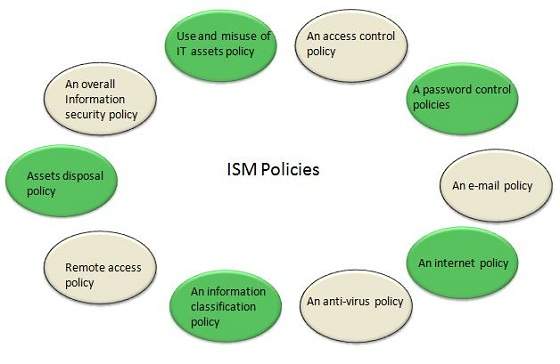
ISM Security Policy

It is required for ISM security policies cover all areas of security, be appropriate, meet the needs of business and should include the policies shown in the following diagram −
Information Security Management | Corporate IT Management (CIM) | Guru@Gndec

ISM Framework

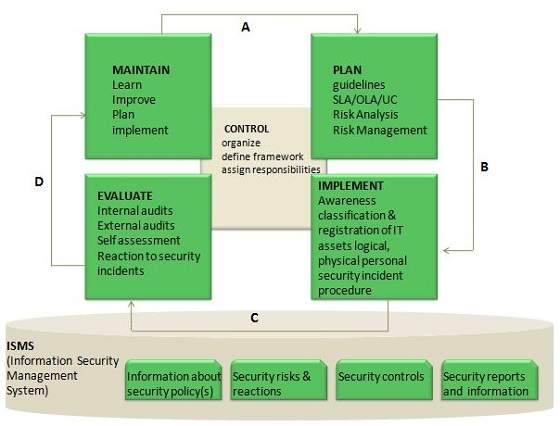
ISM Process

The following diagram shows the entire process of Information Security Management (ISM) −
Information Security Management | Corporate IT Management (CIM) | Guru@Gndec

Key elements in ISM Framework

ISM framework involves the following key elements −

Control

The objective of Control element is to −
  • Establish an organization structure to prepare, approve and implement the information security policy
  • Allocate responsibilities
  • Establish and control documentation

Plan

The purpose of this element is to devise and recommend the appropriate security measures, based on an understanding of the requirements of the organization.

Implement

This key element ensures that appropriate procedures, tools and controls are in place to underpin the security policy.

Evaluation

The objective of Evaluation element is to −
  • Carry out regular audits of the technical security of IT systems
  • Supervise and check compliance with security policy and security requirements in SLAs and OLAs

Maintain

The objective of Maintain element is to −
  • Improve on security agreements as specified in, for example, SLAs and OLAs
  • Improve the implementation of security measures and controls

Preventive

This key element ensures prevention from security incidents to occur. Measures such as control of access rights, authorization, identification, and authentication and access control are required for this preventive security measures to be effective.

Reductive

It deals with minimizing any possible damage that may occur.

Detective

It is important to detect any security incident as soon as possible.

Repressive

This measure is used to counteract any repetition of security incident.

Corrective

This measure ensures damage is repaired as far as possible.